Custom scripts
Gephi-Lite does not have a plugin marketplace, but it includes a native scripting language: JavaScript. In many places, this lets you write JavaScript code instead of using the standard features.
Nodes/Edges filtering
From the Filters menu, choosing Custom script opens the script editor, allowing you to implement this function:
/**
 * Define a custom filter function.
 * The function is executed for each node.
 * If it returns true, the node is included in the result set; otherwise, it is excluded.
 *
 * @param {string} id ID of the item
 * @param {GraphNode} attributes Attributes of the item
 * @param {AbstractGraph<GraphNode, GraphEdge>} graph Graphology instance (https://graphology.github.io/)
 * @return {boolean} TRUE if the item should be kept in the graph, FALSE to filter it
 */
function nodeFilter(id, attributes, graph) {
  //
  // Your code goes here
  //
  return true;
}
When filtering edges, the function is named edgeFilter, and attributes holds the edge attributes (GraphEdge).
Examples
- Keep nodes that have a property 'age' greater than
18:
function nodeFilter(id, attributes, graph) {
  return attributes.age > 18;
}
- Keep nodes that have a property 'age' below
18and a degree below10:
function nodeFilter(id, attributes, graph) {
  return attributes.age < 18 && graph.degree(id) < 10;
}
- Keep nodes on which the property 'job' is defined:
function nodeFilter(id, attributes, graph) {
  return attributes.job !== undefined;
}
- Keep edges that have a property 'cooccurrence' greater than
5:
function edgeFilter(id, attributes, graph) {
  return attributes.cooccurrence > 5;
}
- Keep edges whose target node has a degree greater than
5:
function edgeFilter(id, attributes, graph) {
  return graph.degree(graph.target(id)) > 5;
}
Custom layout
In the Layout menu, selecting Custom layout opens the script editor, where you can implement this function:
/**
 * Function that returns coordinates for the specified node.
 *
 * @param {string} id The ID of the node
 * @param {GraphNode} attributes Attributes of the node
 * @param {number} index The index position of the node in the graph
 * @param {AbstractGraph<GraphNode, GraphEdge>} graph The graphology instance (https://graphology.github.io/)
 * @returns {x: number, y: number} The computed coordinates of the node
 */
function nodeCoordinates(id, attributes, index, graph) {
  //
  // Your code goes here
  //
  return { x: Math.random() * 1000, y: Math.random() * 1000 };
}
Examples
- Random layout on a 1000x1000 space (the default function):
function nodeCoordinates(id, attributes, index, graph) {
  return { x: Math.random() * 1000, y: Math.random() * 1000 };
}
- Circular layout:
function nodeCoordinates(id, attributes, index, graph) {
  return {
    x: Math.cos((index * (Math.PI * 2)) / graph.order) * 500,
    y: Math.sin((index * (Math.PI * 2)) / graph.order) * 500,
  };
}
Scripted node/edge attribute
On the Data page, choosing Create nodes scripted attribute in the Data creation menu opens the script editor, allowing you to implement this function:
/**
 * Function that returns a new attribute value for the specified node.
 *
 * @param {string} id The ID of the node
 * @param {GraphNode} attributes Attributes of the node
 * @param {number} index The index position of the node in the graph
 * @param {AbstractGraph<GraphNode, GraphEdge>} graph Graphology instance (https://graphology.github.io/)
 * @returns number|string|boolean|null|undefined" The value of the new node's attribute
 */
function addNodeAttribute(id, attributes, index, graph) {
  //
  // Your code goes here
  //
  return Math.random();
}
Create edges scripted attribute works the same way, with a function named addEdgeAttribute.
Examples
- If you have an attribute named 'valid' which takes
0or1, and you want to cast it into a boolean:
function addNodeAttribute(id, attributes, index, graph) {
  return attributes.valid === 1;
}
- If you have attributes named 'firstname' and 'lastname', and you want to concatenate them (useful for graph labels):
function addNodeAttribute(id, attributes, index, graph) {
  return (attributes.firstname || "") + " " + (attributes.lastname || "");
}
Script editor
The script editor is displayed in a modal.
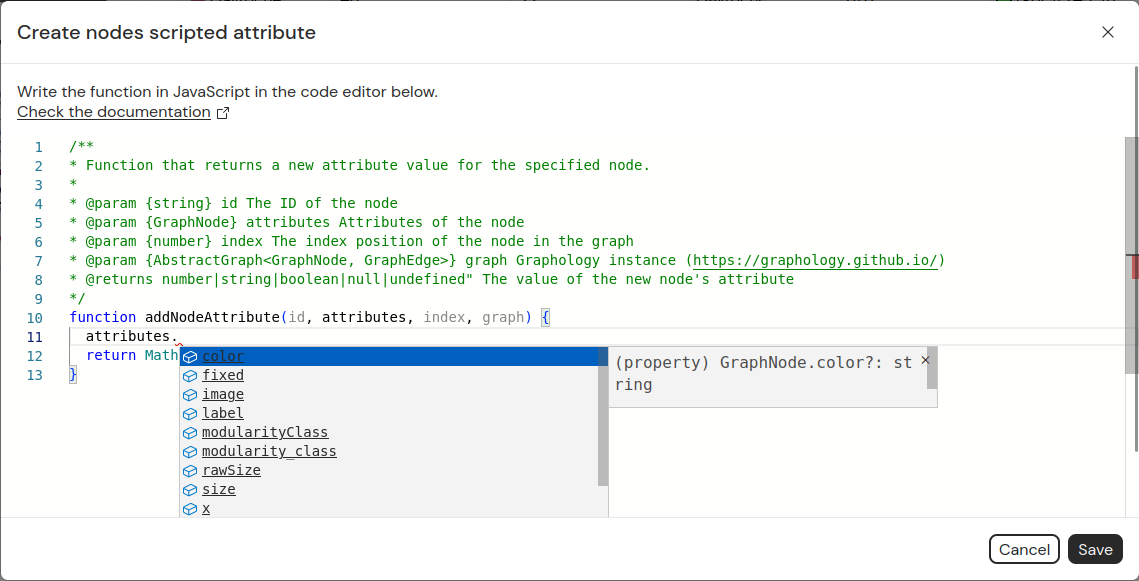
The editor is based on Monaco, so if you use VS Code, it should feel
familiar. Types are defined for each function parameter (such as attributes or graph), and the
Graphology types are loaded, enabling autocompletion on the graph methods.
The documentation comment at the top of the function cannot be edited.
Press Ctrl+Enter to save and run your function.